-->


Translate

Showing posts with label file. Show all posts

File opening modes and file pointer c tutorial

Leave a Comment
This C programming tutorial explains following concepts
  1. Open a c file and what are the opening modes
  2. What is a File pointer
  3. Close a c file
  4. Read and write character to a file


How to open a file using c language? Also discuss its different file opening modes.
File Opening:
  • Before read or write operation, a file should be opened.
  • All standard file handing function of C are declared in stdio. h header file
  • When a file is opened a point of memory is reserved for file to read and write this memory is called memory buffer.
  • When a file is read it is first stored in the memory buffer and then program reads the file from the memory buffer.
  • When a file is written, then it is written in buffer, then its contents are transferred on the disk.
  • The transfer of data from buffer to the disk is called flushing of buffer.
  • The writing and reading through file through disk is time consuming, therefore time of reading and writing data to a file is reduced through buffer.

The File Pointer:
  • A pointer is like a variable whose content is the address of another memory cell (variable).
  • Represents a pointer to the variable with which it is used.
  • A file is not directly accessible in C.
  • File are accessed through I\O buffers.
  • A file pointer is a variable of FILE type defined in stdio.h
  • FILE* represents a pointer to a variable of FILE type.
  • The fopen( )function is used to open a file.
 Prototype is: FILE*fopen(const char*filename,const char*mode);
 OR
 FILE*fp; // it specifies the file pointer.
 Fp=fopen(file,mode);


File opening Modes:

  • “r” open text file for reading,each file must exists before reading.
  • “w” open a text file for writing, if the file already exists then its contents are overwritten, if it does not exists, it will be created.
  • “a” open a text file for append. Data is appended at the end of existing file. If the file does not exist, it will be created.
  • “r+” open a file for both reading and writing. The file must already exists
  • “w+” open a file for reading and writing, its contents are overwritten if the file does not exist, it is created.
  • “a+” open a text file for both reading and appending. If the file does not exist, it is created for both reading and writing.


The fopen function returns the null pointer, if it fails to open the file (most common reason is file does not exist).

How to close a file in the c language?
File Closing:

  • An open must be close after completing the task.
  • When a file is close then the buffer is flushed (data is transferred on the disk).
  • If the file is not close than the data may be lost.
  • The fclose () function is used to close a file.
  • Syntax:
fclose(fp);
Where fp is a file pointer associated to a file which is to be closed.
fclose () function returns 0 if the close operation is successfully completed.
fclose () function returns EOF if any error occurs.

How to read and write character to a file using C language?

  • Once a file has been opened depending on its opening mode then either a character can be read from a file or character can be written to a file using the following function
  • Putc( ):
  • The putc( ) function writes a single character to the file.
  • The putc ( ) function returns the characters, if it successfully writes it.
  • The putc ( ) function returns the EOF if an error occurs.
Syntax:
putc(character ch , file_pointer);

see example: copy data from one text file to another c source code

Character ch can be character, int, constant or a variable.
File pointer specifies variable of FILE type associated with the file in witch character is to be written.
Read More...

copy data from one text file to another c source code

1 comment
Write a c/c++ program which reads one text file and writes its data to another file. Hint use functions gets()  and fputc().

Concept used in this tutorial

Program explanation:
  • We have two files Input(text.txt) and output(text2.txt) data will be read from input file and write to output file which means that input file will be opened in read mode "r" and output file will be opened in write mode "r".
  • We have two if conditions which ensures files are accessible or not.
  • Using getc() function in while loop 'ch' is assigned character by character of input file then write into the output file using fuptc() function until it reaches EOF(end of file)
Source code

#include <iostream>
#include <stdio.h>
#include <conio.h>

using namespace std;

int main()
{
    FILE *input;
    FILE *output;

    char ch;

    input = fopen("text.txt","r");
    if(input == NULL){

       printf("\n Required File text.txt failed to open ");

    } else {
       output = fopen("text2.txt","w");
           if(input == NULL){

            printf("\n Required File text2.txt failed to open ");

          } else { //File opened successfully

                while((ch = getc(input))!= EOF) {
                      fputc(ch, output);
                }

             printf("\n Data is Copied ");

           }

    }
    printf("\t\t");

    fclose(input );
    fclose(output);

    cout<<"\n\n\n";
    return 0;
}

To read and write file in your desire director give path in fopen function e.g
fopen("c:/text.txt","r");
It is recommended to do experiment with code and examine the output of program.  
Read More...

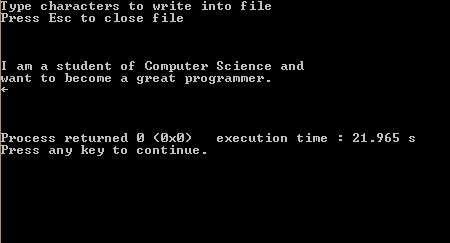
write data into a text file c++ program

3 comments
Write a C++ program in which user will continuously enter data into a text file and program should terminate when user press ESC key. Keep the program as simple as you can use any c++ compiler CodeBlocks is recommended.
Concept used
File pointer  FILE * represents pointer to a variable of FILE type

function fopen() is used to open a file and takes two parameters.
  1. Name of a file with its extension in double quotes it can include file path or not
    for example "NewFile.txt"  or  "c://NewFile.txt" if path is not specified it will open a
    file in current directory where your .c or .cpp file is.
  2. File opening mode it represent the purpose of opening of file and what operation will be perform on the file reading, writing, or editing. In this example file mode will be "w" for
    writing
fopen prototype FILE *fopen(const chr *fileName,  const char *mode );

Program explanation

  • A while loop is used and will terminate when user will press esc key. To get the characters a function getche() is used from conio.h which will store in char variable and store into the file using putc() function. 
  • On pressing esc to avoid any other character written into the file an if condition is used which will write space into the file when user will press escape.
C++ source code

#include <iostream>
#include <stdio.h>
#include <conio.h>

using namespace std;

int main()
{
    FILE *fp;
    char ch;
    fp = fopen("text.txt","w");
    cout<<"Type characters to write into file"<<endl;
    cout<<"Press Esc to close file\n\n\n"<<endl;

    while(ch!=27) {

      ch=getche();

      if(ch==27) {
         putc(' ',fp);
      } else {
         putc(ch,fp);
      }


      if(ch==13) {
         cout<<"\n";
         putc('\n',fp);

      }

    }// end of while loop

    fclose(fp);
    cout<<"\n\n\n";
    return 0;
}


Input Output of program
c++ program to write data into a text file


Recommended: For good learning do experiment with code and examine the output
Read More...

Creating file in Turbo C++

8 comments
Step 1:
Go to drive where Turbo C is installed then go to bin folder
Click on turbo c icon then follow steps
Create a file:
Open menu by using cursor or type shortcut key ALT+F4 then select new to open new file.
Step 2:
Save a file:
To save a file select save from menu or press F2 shortcut key.
Then a box will appear like that
Then before extension .cpp an asterisk will appear or you will see a word "noname" remove asterisk or noname word and replace it your file desired name e.g. first.cpp and then press OK your file will save in respective directory.
RECOMMENDED way naming to your file:
Name your file or program to less than or equal than six characters otherwise compiler can face problem to execute a program which have greater name than six characters.  
Step 3:
Compile a program:
To compile a program go to menu bar and select compile option or press short cut key ALT+F9
Then compiler will show how many errors, warnings and lines executed in your program and also identify line number in which error is found.
Step 4:
Running a program by using Turbo C++ menu bar.
To run program go to menu bar select the run option or press shortcut key ALT+F5.
Read More...