-->


Translate

Showing posts with label strcat. Show all posts

string function strcat c++ example

Leave a Comment
Strcat function comes from the string class with string.h header file. It takes two strings as parameters and return second string append to the first string with putting null character at the end of the string.


Example C++ program 
A C++ program which takes two strings as input from user each of type char and concatenates them with the help of strcat function and displays the result.

See also: concatenate two string without using strcat

strcat example C++ source code

#include <iostream>
#include <string.h>
#include <stdio.h>

using namespace std;

int main()
{
    char str1[100],str2[100];

    cout<<"\nEnter first string: ";
    gets(str1);

    cout<<"\nEnter second string: ";
    gets(str2);

    strcat(str1, str2);

    cout<<"\n\n\t\Resultant first String after concatenation: "<<endl;
    cout<<"\n\n\t\t\t"<<str1<<"\n\n\t\t\t";

          return 0;
}


Input Output
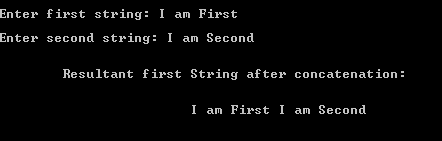
strcat example c++ source code

Its a simple program example it is recommended to change the code and examine the output. Happy learning C++
Read More...

concatenate two strings in c++ without using strcat

2 comments
Write a C++ program which take two strings as input from user and concatenate two strings without using the string class function strcat(). Keep the order as first come first and second comes second after concatenation.

This c++ tutorial covers following concepts


  • while loop
  • char array
  • if statement

How c++ program works
  1. There are total 3 strings two for input and third for our result. Each string has fixed size you may change as your requirement. 
  2. There are two index variables both initialized by zero at the beginning of program to get access the index value of both strings
  3.  There are two while loops in the program runs till null not found in both string.
  4. Using index we start read first string from zero index and write its value to resultant string same with the second while loop where we keep increment the index variable value and access second string by the use of index2 variable.
  5. At the end we use for loop variable to show result.


C++ program source code


#include <iostream>
using namespace std;

int main()
{
        int index = 0;
        int index2 = 0;
        const int SIZE = 10;

        char firstStringObj[SIZE], secondStringObj[SIZE], concatString[50]={'0'};

        cout<<"Enter first String: ";
        cin>>firstStringObj;

        cout<<"Enter second String: ";
        cin>>secondStringObj;

        while(firstStringObj[index] != '\0') {
             concatString[index] = firstStringObj[index];
             index++;
            }

        while(secondStringObj[index2] != '\0') {
              index++;
              concatString[index] = secondStringObj[index2];
              index2++;
            }

         cout<<"\n\n\nConcatenated String: ";
            for(int j=0;j<SIZE+SIZE;j++)
                cout<<concatString[j];
         cout<<"\n\n\n";
    return 0;
}

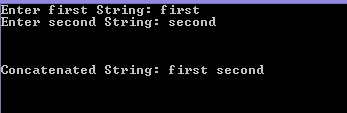
Program output 

concatenate two strings without using strcat string class function


see also:
count number of vowels in arrays

               concatenate two strings using strcat string class function

More examples: C++ programming examples


Read More...