-->


Translate

Showing posts with label function. Show all posts

c++ recursive function to print numbers in descending order

1 comment
Write a program in which a function takes input from user and print numbers in descending order using recursion. Make proper prototype with one integer as argument and return an integer. 
hint: int decrement(int);


Program Logic Explanation

  • In this program we have a function having an if-else statement 
  • If and else both have return on the basis of certain conditions.
  • If condition has the base case which means that program output will not return result
    until the base case is true
  • As we know function returns from where it has called so if user enters 5 then function will be
    called 5 times one from the outside and 4 times form else statement when base case becomes
    true it returns in else to 4 times and finally 5th time to main body

C++ Source Code

#include<iostream>
using namespace std;
int decrement(int);
int main()
{
 int number;
 cout<<"Enter number to get decrement using recursion";
 cin>>number;
 cout<<decrement(number);
 cout<<" "<<endl;
 return 0;
}
int decrement(int num)
{
 if(num==1)
 {

  return 1;
 }
 else
 {
  cout<<num<<" ";
  return decrement(num-1);
 }
}


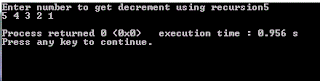
Example input output
c++ recursive function example to output numbers in descending order

It is recommended to change the code, dry run on a paper and examine the output.
See more examples here
C++ Simple example for beginners
Read More...

search a character in a string strchr c++ example

1 comment
strchr is a string class function which helps to find a character in a string. It takes two parameters first is string and second is character to search. 
It returns NULL if specified character not found else it returns a pointer value. Remember it is case sensitive "C" and 'c' are different characters for this function

Write a c++ program which takes a string from user and a character then search a character 


C++ program source code


#include <iostream>
#include <string.h>
#include <stdio.h>

using namespace std;

int main()
{
    char stringObj[100], ch;
    char *result = NULL;

    cout<<"\nEnter a String: ";
    gets(stringObj);
    cout<<"\nEnter character to search in string:   ";
    cin>>ch;
    result = strchr(stringObj, ch);
    if(result == NULL) {
         cout<<"\nCharacter ' "<<ch<<" ' NOT FOUND in : "<<stringObj<<endl;
    } else {
         cout<<"\nCharacter ' "<<ch<<" ' FOUND in : "<<stringObj<<endl;
    }
          return 0;
}


program output: 
strchr c++ example

 Program with case sensitive output
strchr c++ example


See also:


Read More...

strncat function c++ example source code

Leave a Comment
strncat function used to concatenate two strings upto specified number of characters. It takes 3 parameters first and second is string third is n where n is number of characters to append first string from second string.
For example
first_string: Hello
second_string: World

strncat( first_string, second_string, 3);

The result will be: Hello Wor

Example program
Write a c++ program which takes 3 inputs from two strings and third is the value of n( the number of characters to append from second string) and display the resultant string.

strncat function C++ source code


#include <iostream>
#include <string.h>
#include <stdio.h>

using namespace std;

int main()
{
    char str1[100],str2[100];

    cout<<"\nEnter first string: ";
    gets(str1);

    cout<<"\nEnter second string: ";
    gets(str2);

    int n;
    cout<<"\nEnter number of characters to concatenat: ";
    cin>>n;
    strncat(str1, str2, n);

    cout<<"\n\n\t\Resultant first String after concatenation: "<<endl;
    cout<<"\n\n\t\t\t"<<str1<<"\n\n\t\t\t";

          return 0;
}


Program output
strncat string class function source code example
  
It is recommended to change the code and examine the output of program.
See Also: strcat function example c++ source code
Read More...

c++ pointer simple example pass by reference

1 comment
Write a program which passes a reference to a function and function has a pointer as argument. Keep the return type void and display result in main body. Apply any maths operation find square of a number
Use any c++ compiler: Codeblocks recommended.

If you have any confusion read this difference b/w pass by value and pass by reference 


#include<iostream>
using namespace std;

void pass_by_reference(int *);
int main()
{
    int number;

    cout<<"Enter Number to Calculate Square: ";cin>>number;
    cout<<"\n\n\n";

    pass_by_reference(&number);
    cout<<"\t\tResult: "<<number<<endl;

    return 0;

}

void pass_by_reference(int *iPtr)
{
    *iPtr=*iPtr * *iPtr;
}


Sample input Output of program
pointer argument example pass by reference


In the above example there is no need to return from function because changes will be made permanently on reference of number.
Find more examples here: C++ Simple Examples 

Read More...

c++ programs to find transpose of a matrix with function and without function

Leave a Comment
Write two C++ programs which asks user to enter number of rows and colums and calculate its transpose and display the result accordingly.
Note: One with function and one without Function
function prototype:
void calculate_transpose(int matrix[5][5], int rows, int cols);
    
First we have to clear about what is transpose of a matrix.
Its to replace the number of rows with number of colums and vice versa to make a new matrix.
for example
if a matrix 'A' has dimension 2X3  means 2 rows 3 colums then new transpose matrix 'T' will be 3X2

        1  2  3                     1    4    
A=   4  5  6              T=   2   5
                                       3   6

C++ Code:   Compiler Used:  CodeBlocks
Without Functioin


    #include<iostream>
    using namespace std;
    int main()
    {

    int matrix[5][5],transpose_matrix[5][5];
    int i,j,rows,cols;
    // Taking Input In Array

      cout<<"Enter Number of ROWS :";
      cin>>rows;

      cout<<"Enter Number Of COLS  :";
      cin>>cols;
       for( i=0;i<rows;i++){
           for( j=0;j<cols;j++)
           {
               cin>>matrix[i][j];
           }
          }

          cout<<"\n Matrix You Entered\n";

       for( i=0;i<rows;i++){
           for( j=0;j<cols;j++)
           {
               cout<<matrix[i][j]<<"     ";
           }
           cout<<endl;
          }


// Calculating Transpose of Matrix
    cout<<"\n\n\nTranspose of Entered Matrix\n";
       for( i=0;i<rows;i++){
           for( j=0;j<cols;j++)
           {
               transpose_matrix[j][i]=matrix[i][j];
           }
           cout<<endl;
          }


//Displaying Final Resultant Array
       for( i=0;i<cols;i++){
           for( j=0;j<rows;j++)
           {
               cout<<transpose_matrix[i][j]<<"    ";
           }
           cout<<endl;
          }

   return 0;
    }


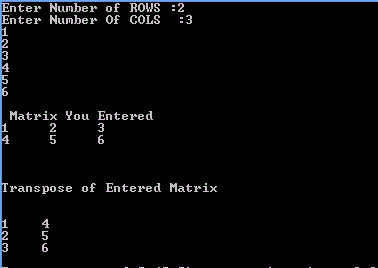
Sample input Output
C++ program transpose example of a matrix


With Function C++ Code:

In this the same code is used but passing the 2D array to a function with size of rows and cols


    #include<iostream>
    using namespace std;

    void calculate_transpose(int matrix[5][5], int rows, int cols);
    int main()
    {

    int matrix[5][5];
    int i,j,rows,cols;
    // Taking Input In Array

      cout<<"Enter Number of ROWS :";
      cin>>rows;

      cout<<"Enter Number Of COLS  :";
      cin>>cols;
       for( i=0;i<rows;i++){
           for( j=0;j<cols;j++)
           {
               cin>>matrix[i][j];
           }
          }

          cout<<"\n Matrix You Entered\n";

       for( i=0;i<rows;i++){
           for( j=0;j<cols;j++)
           {
               cout<<matrix[i][j]<<"     ";
           }
           cout<<endl;
          }


//**********CALLING FUNCTION************//
      calculate_transpose(matrix,rows,cols);


   return 0;
    }

 void calculate_transpose(int matrix[5][5], int rows, int cols)
{    int i,j;
    int transpose_matrix[5][5];
    cout<<"\n\n\nTranspose of Entered Matrix\n";
       for(i=0;i<rows;i++){
           for( j=0;j<cols;j++)
           {
               transpose_matrix[j][i]=matrix[i][j];
           }
           cout<<endl;
          }

       for(i=0;i<cols;i++){
           for( j=0;j<rows;j++)
           {
               cout<<transpose_matrix[i][j]<<"   ";
           }
           cout<<endl;
          }

}


Find more examples here:


Read More...

Cpp Tutorial to reverse an array code

2 comments
Write a program which takes some elements as input in integer array then pass this array to a function which reverse its elements using for loop and swapping. 
 Display the reversed array with index number. Loop should execute less than array size. Use any c compiler (codeBlocks recommended).

This tutorial contains the following concepts

Program explanation
  • Program declare an integer array of size five, initialize it using for loop
  • Pass size and array name to function 
  • Function uses for loop and swap array elements with in it
  • A for loop is used to display the final result

Compiler used: CodeBlocks C Compiler
 code:
  1. #include <iostream>
  2. using namespace std;
  3. void Reverse_Array(int array[],int size)
  4. {   int temp;
  5.     size--;
  6.     int loop_count=0;
  7.     for(int i=0;size>=i;size--,i++)
  8.     {
  9.         loop_count++;// Counts the iterations
  10.         temp=array[i];
  11.         array[i]=array[size];
  12.         array[size]=temp;
  13.     }
  14.     cout<<"Number of Iterations: "<<loop_count<<endl;
  15. }
  16. int main()
  17. {
  18.     int array[5],i;
  19.     cout<<"\nEnter 5 Integer Values in Array\n"<<endl;
  20.     for(i=0;i<5;i++)
  21.     {
  22.     cout<<"Enter Value For Index Number array [ "<<i<<" ] -> ";
  23.     cin>>array[i];
  24.     }
  25.     // Calling Reverse Array Values Function
  26.     Reverse_Array(array,5);
  27.     cout << "\n\n\t\t\tReversed Array Values" << endl;
  28.     for(i=0;i<=4;i++)
  29.         {
  30.          cout<<"\t\t\tarray ["<<i<<"]"<<"= "<<array[i]<<endl;
  31.         }
  32.     return 0;
  33. }


Sample Input  output on C compiler
cpp tutorial to reverse an integer array using function and for loop


This tutorial is helpful to understand the array indexing and how to swap the index values. Its is recommended for beginners to edit and do experiment with code. Best of luck for learning cpp programming language.
 Find More Basic Examples here
C++ simple examples
Read More...

Cpp Function to Find Largest and smallest number in array

1 comment
This Cpp tutorial contains
 Compiler used: CodeBlocks Cpp Compiler

Write a program which generates some random number and store in array after it program pass array to a function which calculates maximum and minimum number in array and display it use any Cpp Compiler to code.

How program works
  • Declare array of size 10
  • Using for loop assign array indexes with random values between 1 and thousand
  • Call the function and pass array and its size as argument
  • Function declares two integers max and min and assign both integers with arrays first index value
  • Then with in for loop there are two if condition first check is for minimum number and second check is for maximum number
  • Finally program display the output values of both integers min and max

      Cpp Code
  1.  #include <iostream>
  2. #include <stdlib.h>
  3. using namespace std;
  4. void FindMaxMin(int *array, int size)
  5. {        int min,max;
  6.          min=max=array[0];
  7.          for(int i=0;i<size;i++)
  8.          {
  9.              if(array[i]<min)
  10.                min=array[i];
  11.             else if(array[i]>max)
  12.                max=array[i];
  13.          }
  14.  cout<<"Minimum Number  = "<<min<<endl;
  15.  cout<<"Maximum Number = "<<max<<endl;
  16. }
  17. int main()
  18. {
  19.     int array[10];
  20.     for(int i=0;i<=9;i++)
  21.         {
  22.          array[i]=rand()%1000+1;
  23.          cout<<"array ["<<i<<"]"<<"= "<<array[i]<<endl;
  24.         }
  25.     FindMaxMin(array,10);
  26. return 0;
  27. }
 Sample Output
Cpp Function To Find Largest And Smallest Number in Array


Another Example without Function more simple
Find Maximum and Minium Number in Array Cpp Code

More Cpp Program Tutorials
C++ Simple Examples
Read More...

Passing array to a function cpp code

Leave a Comment
 This Cpp Tutorial contains
  • 3 ways to pass an array to a function
  • Each way and its usage
  • 3 c++ codes examples
  • How codes are working 
  • Sample output
  • Compiler used "C++ CodeBlocks Compiler"

Write a program which declares an array, initialize it then pass to a function. Function takes square of array values and update it. Show updated values in main function.

Concept used:
How programs works
  •   Declare array of size 10
  •   Initialize it using for loop
  •   Calling "UpdateArray" function and passing array as           argument
  •   Take squares of all values and update it
  •   Display final result in main function
 
Note: Function return type is void why? 
          As we know array name is constant pointer memory location if we get this location we can update it after updating if we access this memory location any where in the program we will get updated values. So no necessarily needs to return array or pointer.

First way
As we know array name is a constant pointer if we can get the this pointer we can access all values of array.
declaring  array in function parameter
Prototype: void  UpdateArray(int array[] );

 c++ code

  1.  #include <iostream>
  2.  using namespace std;
  3.  void UpdateArray(int array[])
  4.  {
  5.      for(int i=0;i<=9;i++)
  6.           array[i]=array[i]*array[i];
  7.  }
  8.  int main()
  9.  {
  10.      int array[10];
  11.      for(int i=0;i<=9;i++)
  12.           array[i]=i+1;
  13.      UpdateArray(array);
  14.  // Updated Values of Array
  15.      for(int i=0;i<=9;i++)
  16.           cout<<array[i]<<endl;
  17.      return 0;
  18.  }


Second way
Prototype: void  UpdateArray(int *array );
Declaring an integer pointer in function parameter
This pointer will receive arrays name(constant pointer) and we can access all values and update too.

  1.   #include <iostream>
  2.  using namespace std;
  3.  void UpdateArray(int *array)
  4.  {
  5.      for(int i=0;i<=9;i++)
  6.           array[i]=array[i]*array[i];
  7.  }
  8.  int main()
  9.  {
  10.      int array[10];
  11.      for(int i=0;i<=9;i++)
  12.           array[i]=i+1;
  13.      UpdateArray(array);
  14.  // Updated Values of Array
  15.      for(int i=0;i<=9;i++)
  16.           cout<<array[i]<<endl;
  17.      return 0;
  18. }


Third way
 In this way we pass two arguments one is arrays name and second   is its size
 In function receiving parameters we declares an array or integer pointer (your choice) to receive address of array and another integer variable size which contains the size of array.
Prototype:  void  UpdateArray(int *array, int size );

  1.  #include <iostream>
  2.  using namespace std;
  3.  void UpdateArray(int *array, int size)
  4.  {
  5.      for(int i=0;i<size;i++)
  6.           array[i]=array[i]*array[i];
  7.  }
  8.  int main()
  9.  {
  10.      int array[10];
  11.      for(int i=0;i<=9;i++)
  12.           array[i]=i+1;
  13.      UpdateArray(array,10);
  14.  // Updated Values of Array
  15.      for(int i=0;i<=9;i++)
  16.           cout<<array[i]<<endl;
  17.      return 0;
  18.  }
 Sample output all the codes have same
passing array to a function cpp code different ways
more Arrays Examples Here
C++ Simple Examples
For best practice do experiment with codes and examine output

if any confusion found dry run the code on a paper.
Read More...

Cpp Tutorial Functions in c++ examples

Leave a Comment
This cpp tutorial contains
  • Introduction to functions in c++
  • Different methods to write functions
  • Examples of c++ functions code
  • Types of functions in c++

What are Functions and why they are important in c++ programming Language

A C++ function may have 2 or 3 phases
  1. Prototype
  2. Calling
  3. Definition or body of a function
  •  First one is optional it can be written or not depend upon the code.
  •  The second and third are compulsory to use

The purpose of a function is to do something like in a defining way. Let we want to do 3 different task then we will make 3 different functions and each function name should give us the idea about our function body.
For example we have to calculate prime numbers and detect vowel characters. There should be two functions one will calculate prime and other will check vowels and their name should be like that
calculatePrime();
in the above link there is a prime number program try to do it in a function for practice
CheckVowel();  
or any other name 

 What a function has
  •   return type
  •  It can be any thing like int,  float, or any other data  structure
  •  If we want to that our function not return any thing we use this
  ' void '  means nothing to return from where function has called    If function is not  returning any thing and function name is myfun then we will write it like that
  void myfun(){

}

Function body
  Function body it starts from curly braces and end with curly braces    void myfun(){ // start of function body        cout<<" I AM A Function";          
   }// end of fucntion body

its a function with
Name:        myfun
Return type:   void     

in funtion body we have written
            cout<<" I AM A Function";          

so now its time to use our function How to use the function?
Answer is CALL It
  As program starts from main() function we will use myfun function with in it or simple we can say we will call it within the main().

SO in order to use or call it write its name in main() with curly brackets just like that
#include<iostream> 
using namespace std;
int main()
{  myfun();  return 0; } // here is our function void myfun(){
cout<<"I Am a Function "; }
Lets Run this program Oh.. it will show an error on the compiler
Note: Its a common programming error a beginner can face
 It occurs because our programs run from top to bottom when compiler will reach at
myfun();  // function calling It will not be able to identify the function because compiler does not know what it is
so in order remove this error first we have to tell the compiler what is myfun(); then use it and write function body before the main() in this way compiler will read our function body first and will not show the error..

#include<iostream>
using namespace std;

void myfun(){
cout<<"I Am a Function "; }
int main(){ myfun(); return 0;
}

An alternate method to solve this error is to write function prototype which tells compiler that a function is exist

#include<iostream>
using namespace std;
void myfun();
// it is a prototype int main()
{ myfun();

return 0;
}
void myfun(){
cout<<"I Am a Function "; }

It is always recommend to write prototype when code is large it increase the readability of program because on a look at prototypesit is clear that what a program is about or what it contains.

Function with return type
If a function do some task in its body and want to send or return the result form where it was called then
Identify the data type or result what has to be send or return write this data type before the function name like below
Let this fucntion wants to return an integer
Function body will be look like that

int myfun()
{

  return result; // here result is of integer type
}

if a return type is defined and function is not returning anything then compiler will through an error e.g. "Function myfun must return "

Function with parameters
If we want to send some information in the form of any data type we can send this info at the time of calling it and this function can return the value too.
Let we want a function to which we send to integers it calculates both sum and return the final result

int Sum2Integers(int first, int second)
{
    int result = first+second;
   return result;
// Above to line can be written in one line like that
// return (first+second);

}

To call it form main()
int main()
{
      int myResult;
      myResult=Sum2Integers(5,5); // calling and sending two ints

}
Here cpp tutorial about basics of Cpp functions ends
here are two examples of functions
 more find here C++ simple examples
If you face any problem comment below your problem.
Read More...