-->


Translate

Showing posts with label program. Show all posts

Append data into text file c programming source code

Leave a Comment
Write a C/C++ program to append a file in which user will enter the file name to open it then enters data to append it. Program should terminate on pressing escape key. When user press enter data should be enter in new line in text file. Use any Compiler CodeBlocks recommended.
Concept used:
Char Array for file name
Loop: while loop for enter data till escape is not pressed
File pointer  FILE * fp; pointer to file
getche() : To get character from console

For basic file input read: write data into  a text file c++ program

Program Explanation:
  • A character array of filename[20] having size equal to 20 used to enter the name of file which has to be appended. If a file is not present of name user entered then a new file will be created in the directory of your .cpp file
  • To append file "a" mode is used in fopen function
  • While loop is used to enter character till escape key is not pressed. When user presses escape a space is added into text file
  • If user presses enter key then an end line is added to text file
C Source Code

#include <iostream>
#include <stdio.h>
#include <conio.h>

using namespace std;

int main()
{
    FILE *fp;
    char ch, fileName[20];

    printf("Enter name of file with extension to append data e.g test.txt:  ");
    scanf("%s",&fileName);

    fp = fopen(fileName,"a");

    if(fp == NULL){
        printf("File Does Not Exist");
        }else {
        printf("Type data press escape to finish: \n\n");
        }

    printf("\t\t");
    while(ch!=27) {

      ch=getche();
      if(ch==27) {
         putc(' ',fp);
      }
      else {
         putc(ch,fp);
      }
      if(ch==13) {
         cout<<"\n";
         putc('\n',fp);

      }

    }

    fclose(fp);
    cout<<"\n\n\n";
    return 0;
}

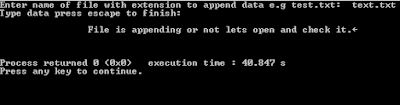
Input output of program
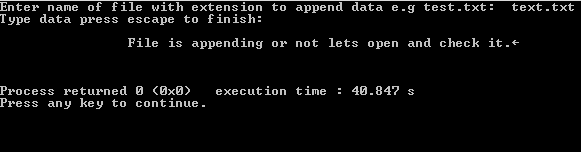
append data into text file c programming source code

Read More...

c++ programs to find transpose of a matrix with function and without function

Leave a Comment
Write two C++ programs which asks user to enter number of rows and colums and calculate its transpose and display the result accordingly.
Note: One with function and one without Function
function prototype:
void calculate_transpose(int matrix[5][5], int rows, int cols);
    
First we have to clear about what is transpose of a matrix.
Its to replace the number of rows with number of colums and vice versa to make a new matrix.
for example
if a matrix 'A' has dimension 2X3  means 2 rows 3 colums then new transpose matrix 'T' will be 3X2

        1  2  3                     1    4    
A=   4  5  6              T=   2   5
                                       3   6

C++ Code:   Compiler Used:  CodeBlocks
Without Functioin


    #include<iostream>
    using namespace std;
    int main()
    {

    int matrix[5][5],transpose_matrix[5][5];
    int i,j,rows,cols;
    // Taking Input In Array

      cout<<"Enter Number of ROWS :";
      cin>>rows;

      cout<<"Enter Number Of COLS  :";
      cin>>cols;
       for( i=0;i<rows;i++){
           for( j=0;j<cols;j++)
           {
               cin>>matrix[i][j];
           }
          }

          cout<<"\n Matrix You Entered\n";

       for( i=0;i<rows;i++){
           for( j=0;j<cols;j++)
           {
               cout<<matrix[i][j]<<"     ";
           }
           cout<<endl;
          }


// Calculating Transpose of Matrix
    cout<<"\n\n\nTranspose of Entered Matrix\n";
       for( i=0;i<rows;i++){
           for( j=0;j<cols;j++)
           {
               transpose_matrix[j][i]=matrix[i][j];
           }
           cout<<endl;
          }


//Displaying Final Resultant Array
       for( i=0;i<cols;i++){
           for( j=0;j<rows;j++)
           {
               cout<<transpose_matrix[i][j]<<"    ";
           }
           cout<<endl;
          }

   return 0;
    }


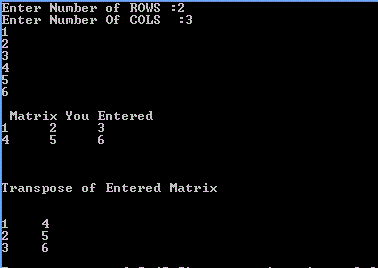
Sample input Output
C++ program transpose example of a matrix


With Function C++ Code:

In this the same code is used but passing the 2D array to a function with size of rows and cols


    #include<iostream>
    using namespace std;

    void calculate_transpose(int matrix[5][5], int rows, int cols);
    int main()
    {

    int matrix[5][5];
    int i,j,rows,cols;
    // Taking Input In Array

      cout<<"Enter Number of ROWS :";
      cin>>rows;

      cout<<"Enter Number Of COLS  :";
      cin>>cols;
       for( i=0;i<rows;i++){
           for( j=0;j<cols;j++)
           {
               cin>>matrix[i][j];
           }
          }

          cout<<"\n Matrix You Entered\n";

       for( i=0;i<rows;i++){
           for( j=0;j<cols;j++)
           {
               cout<<matrix[i][j]<<"     ";
           }
           cout<<endl;
          }


//**********CALLING FUNCTION************//
      calculate_transpose(matrix,rows,cols);


   return 0;
    }

 void calculate_transpose(int matrix[5][5], int rows, int cols)
{    int i,j;
    int transpose_matrix[5][5];
    cout<<"\n\n\nTranspose of Entered Matrix\n";
       for(i=0;i<rows;i++){
           for( j=0;j<cols;j++)
           {
               transpose_matrix[j][i]=matrix[i][j];
           }
           cout<<endl;
          }

       for(i=0;i<cols;i++){
           for( j=0;j<rows;j++)
           {
               cout<<transpose_matrix[i][j]<<"   ";
           }
           cout<<endl;
          }

}


Find more examples here:


Read More...

c++ program to add two matrices

Leave a Comment
Write a c++ program to add two matrix using 2-D arrays use any c++ compiler, turbo c++, visual studio or codeblocks.
2D arrays are just like tables which consist of rows and colums and each cell contains a value.
Matrix addition as


1     2         1     2           1+1     2+2                       2         4
            +                = >                           Result=
3     4         3     6          3+3      4+6                       6        10


Concept used:
  • const int  (Important concept here for array size)
  • 2D arrays
  • Nested for loops


Program explanation:
  • For 2D array size there must be constant value in square brackets like
    array[constant value][constant value]
  • Two const variables row and col are used to define size
    if we do not make both const then error found because without const reserve word they are
    behaving as variable.
  • Before placing both variable in square brackets they must initialized else error will be found
  • three nested for loops are used two for taking input in matrix 2D arrays and one for resultant matrix

c++ code
compiler:  
codeblocks c++ compiler


#include<iostream>
using namespace std;

int main(){

//Using const int for array size
    const int row=2,col=2;
// if not use const error found

cout<<"Size of Matrices : "<<row<<" X "<<col<<endl;
cout<<"Enter Value For First Matrix:"<<endl;

int first[row][col], second[row][col];

int i,j;
for( i=0;i<row;i++){

    cout<<"Enter value for row number: "<<i+1<<endl;
    for( j=0;j<col;j++){
        cin>>first[i][j];
    }

}


cout<<"\n\n\nEnter Value For Second Matrix:"<<endl;
for( i=0;i<row;i++){

    cout<<"Enter value for row number: "<<i+1<<endl;

    for( j=0;j<col;j++){
        cin>>second[i][j];

    }

}

// Resultant Matrix
for( i=0;i<row;i++){

    for( j=0;j<col;j++){
        first[i][j]=first[i][j]+second[i][j];

    }

}

cout<<"\n\n\t\tResultant Matrix:"<<endl;
for( i=0;i<row;i++){
    cout<< endl;
    for( j=0;j<col;j++){
        cout<<"\t\t"<<first[i][j]<<"    ";

    }

}
return 0;
}


sample input out:
c++ program to add two matrices using 2D array


This program is helpful for c++ beginners to understand the basic working of 2D arrays. It is recommended to change the code and examine the output.
Read More...

Writing first Hello World program and detail explanation

2 comments

1.What is preprocessor directory?


  • It always starts with # symbol it tells the compiler what kind of header file include in this program to execute it. It gives access to compiler to access the libraries which contain definition of standard library functions and some specific word.
  • where in program iostream.h and conio.h are  header files having extension of .h  header files contains definition of some specific words e.g iostream.h contain defination of "cout<<" and conio.h contains definition of clrscr();  and getch();

Note:If we don't include iostream.h  and conio.h then compiler will show error because compiler will unable to find the definition of word which header file tells.
2. main()

  • It indicates the beginning of the actual body of program where open brace indicates beginning of body and closing brace shows closing of body of program.
  • Every C program have main function without it compiler generates error and program cannot run.

3. Delimiters
What are delimiters?

  • These are the braces which indicates the beginning and ending  of main() body
  • {indicates beginning
  • } indicates ending

4. cout<<
The word cout followed by << like that  cout<< is use to show output in C programming
5. Statement terminator

  • Every C statement ends with statement terminator called semicolon symbol; without it compiler generates error and program cannot run.


6. clrscr();

  • It is a standard library function.Why we use it?
  • we use it to clear the previous output of program.
  • For example:if we execute our program again and again without writing clrscr();
  • Then compiler will show the output of current program that executed and also display the previous output of program.

7. getch();

  • It is also a standard library function why we use it?
  • It is use to hold the output or output screen if we
  • Do not use it then we are unable to see our programs output.
  • Note: It is possible that in the start beginner  face some  difficulties and unable to understand the above explanation but beginner should remember this general method of writing a C program when he or she will move forward confusions will clear.
Read More...