-->


Translate

Showing posts with label example. Show all posts

c++ program for complex numbers using class

3 comments
C++ class for addition, subtraction, multiplication and division for complex numbers

Class has four functions to perform arithmetic operations. It takes two complex numbers input from user real and imaginary parts separately.

The double data type is used to perform all operations. Code tested using c++ CodeBlocks IDE.


#include <iostream>
using namespace std;

//**********COMPLEX CLASS************************
class Complex{

private:
 double real,imag;

public:
 Complex(){
  real=imag=0;
 }
 ///////////////////////////////////////////////////
 Complex(double r){
  real=r;
  imag=0;
 }
    ///////////////////////////////////////////////////
 Complex(double r, double i){
  real=r;
  imag=i;
 }
    ///////////////////////////////////////////////////
 Complex(Complex &obj){
  real=obj.real;
  imag=obj.imag;
 }
    ///////////////////////////////////////////////////
 Complex add(Complex c){
        Complex Add;
  Add.real = real + c.real;
  Add.imag = imag + c.imag;
        return Add;
 }
    ///////////////////////////////////////////////////
 Complex sub(Complex c){
  Complex Sub;
  Sub.real = real - c.real;
  Sub.imag = imag - c.imag;
  return Sub;
 }
    ///////////////////////////////////////////////////
 Complex mult(Complex c){
        Complex Mult;
  Mult.real = real*c.real - imag*c.imag;
  Mult.imag = real*c.imag - c.real*imag;
  return Mult;
 }
    ///////////////////////////////////////////////////
 Complex div(Complex c){
  Complex Div;
  Div.real = (real*c.real + imag*c.imag)/(c.real*c.real + c.imag*c.imag);
  Div.imag = (imag*c.real + real*c.imag)/(c.real*c.real + c.imag*c.imag);
  return Div;
 }
    ///////////////////////////////////////////////////
 void print(){
        cout<<real<<"+"<<imag<<"i"<<endl<<endl;
 }
    ///////////////////////////////////////////////////
 double getReal() const{
  return real;
 }
    ///////////////////////////////////////////////////
 double getImag() const{
  return imag;
 }
    ///////////////////////////////////////////////////
 void setReal(double re){
  real = re;

 }
    ///////////////////////////////////////////////////
 void setImag(double im){
        imag = im;
 }
 ///////////////////////////////////////////////////

};

//***************MAIN***************************
int main()
{
 double real1,imag1,real2,imag2;

 cout<<"Enter the Real  part of First Number: ";
    cin>>real1;
 cout<<"Enter the imaginary  part of First Number: ";
 cin>>imag1;
    Complex obj1(real1,imag1);
 obj1.print();

 cout<<"Enter the Real part of Second Number: ";
 cin>>real2;
 cout<<"Enter the Imaginary part of second number: ";
    cin>>imag2;
    Complex obj2(real2,imag2);
 obj2.print();

 Complex c;
 c = obj1.add(obj2);
 cout<<"Addition is : ("<<c.getReal()<<")+("<<c.getImag()<<")i"<<endl;
 c= obj1.sub(obj2);
 cout<<endl<<"Subtraction is : ("<<c.getReal()<<")+("<<c.getImag()<<")i"<<endl;

 c= obj1.mult(obj2);
 cout<<endl<<"Multiplication is : ("<<c.getReal()<<")+("<<c.getImag()<<")i"<<endl;

 c= obj1.div(obj2);
 cout<<endl<<"Division result  is : ("<<c.getReal()<<")+("<<c.getImag()<<")i"<<endl;
 return 0;
}


program input-output
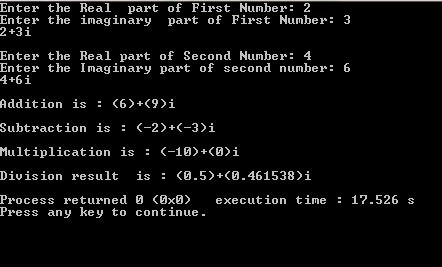
complex number class example c++ code
program output


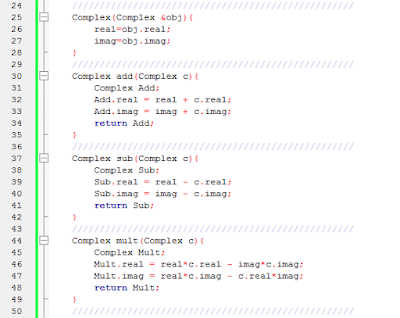
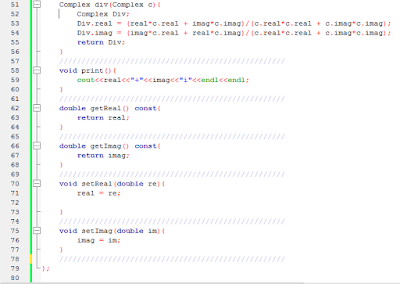
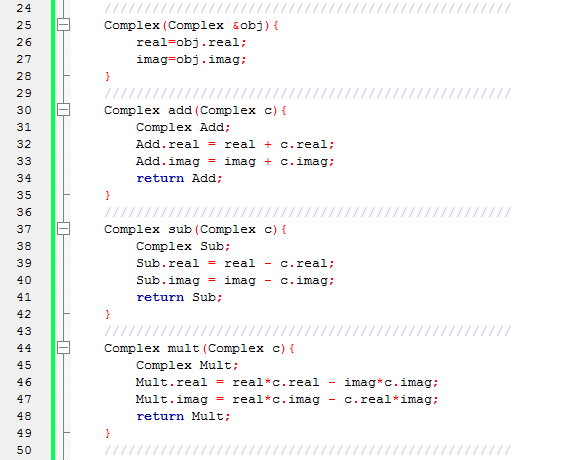
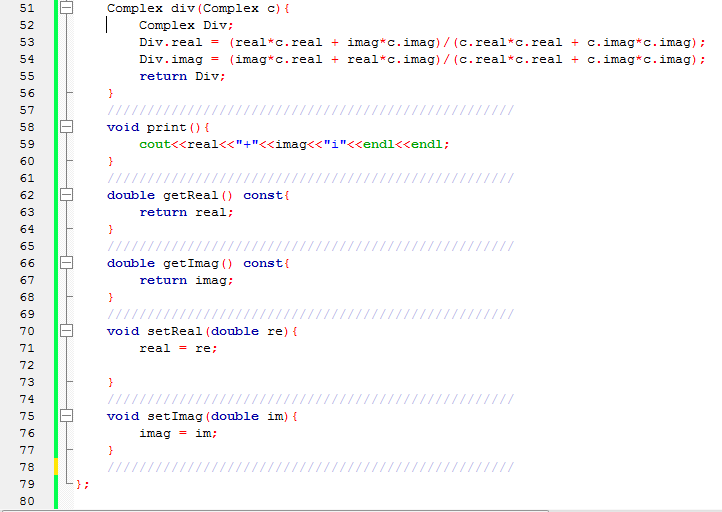
Program images
complex number c++ code
complex numbers
complex number c++ program
c++ class complex number code


also, find more examples here C++ Examples

Read More...

Array based Queue c++ simple project

Leave a Comment
In this c++ tutorial we will discuss  about Array Based Queue C++ project which have 10 functions including main function. User will select an option from main menu function and the respective function will be called. The code is for array based queue implementation. It comprises of various operations that can be performed on array based queue. This code can be used as a project or self-assignment by beginners of data structure. It is recommended to understand the code thoroughly mainly the “logic” then try to create logic for each individual function by yourself. It will surely enhance your coding capability

What is a Queue?
  • List of items arranged on basis of first in and first out principal is called queue.
  • It has 2 ends.
  • Data can be considered as to pass through hollow cylinder.
  • Data enters from one end and leaves from another end.
  • Data only moves in one direction.


Characteristics Of Queue:


  • It works on the FIFO (first in first out) principal.
  • It is ordered list and has elements/data of same type.
  • It doesn’t allow duplication of data.
  •  Enqueue function is used to insert new item in queue.
  • Dequeue function is used to remove any item from queue.
  •  If you want to dequeue any random item from queue, you will have to first dequeuer all items above it. Then remove the item you want. Then enqueue dequeued items accordingly.
cpp queue source code
queue image example 


Real World Examples:


  1. People standing in a queue for submission of their bills in bank. The person who came first will submit bill first. The person who came later will submit bill later.
  2. Cars on one way road. The car that entered first will exists first while the car that entered later will exit later.


Array Based Queue in C++ Data Structures
It is a linear data structure in which insertion of data/element takes places from end (rear) and deletion of data/element takes place from front (head).It allows you to store a data in form of array.

Project Overview:

Below I am going to share with you a c++ source code that is compiled using dev c++ compiler. The code is for array based queue implementation. It comprises of various operations that can be performed on array based queue. This code can be used as a project or self-assignment by beginners of data structure. It is recommended to understand the code thoroughly mainly the “logic” then try to create logic for each individual function by yourself. It will surely enhance your coding capability.

Code:

#include<iostream>     //header files
#include<conio.h> //header files
#include<stdlib.h>      //header files
#include<stdio.h>     //header files
using namespace std;

//////////////////////////////////////////////////////////////////////////////////////
/*declaration of global variables*/
/* front will show first index of array, initiated with -1 that shows that nothing is present at first position in queue*/
int front=-1;   
/* rear will show first last index of array, initiated with -1 that shows that nothing is present at last position in queue*/
int rear=-1;
int index=0;          // index will represent that how long is queue
int *queue=new int[index];      // for dynamical creation of queue
//////////////////////////////////////////////////////////////////////////////////////
/*declaration of functions*/
The functions below are named in such a way that they will clearly reveal what they are meant for
//////////////////////////////////////////////////////////////////////////////////////
void createqueue();
void enqueue(int a);
int dequeue();
void deletequeue();
void clearqueue();
int isfull();
int isempty();
void find();
void display();
void menu();

/////////////////////////////////////////////////////////////////////////////////////
The function below is the first function that would be called when code is executed. It will display a menu having different functionalities. Just select the number corresponding to operation you want to perform and then you will be on your way to go 
////////////////////////////////////////////////////////////////////////////////////
void menu()
{ 
     system("pause");     /*built in function supported by dev c++ to pause a screen until “enter” or any key is entered to proceed further.*/
     system("cls");   /*It will remove any garbage value that may appear on screen*/
     int option;
     cout<<"****welcome to queue application****\n";
     cout<<"press 1 to create queue\n";
     cout<<"press 2 to display queue\n";
     cout<<"press 3 to delete queue\n";
     cout<<"press 4 to clear queue\n";
     cout<<"press 5 to find number in queue\n";
     cout<<"press 6 to enqueue\n";
     cout<<"press 7 to dequeue\n";
     cout<<"press 8 to check if queue is full\n";
     cout<<"press 9 to check if queue is empty\n";
     cout<<"press 0 to exit\n";
     cout<<"enter option\n";
     cin>>option;
//////////////////////////////////////////////////////////////////////////////////////
Below I have used a switch to call various functions. If you are a beginner and don’t have any idea about “switch” you can go ahead with if-else statements but their drawback is they mess up everything, make confusions as code gets lengthy. 
/////////////////////////////////////////////////////////////////////////////////////     
     switch(option)
     {
     case 1:   // this case will simply call create queue function and will create it.
          createqueue();
          menu();
          break;
          
     case 2:   // this case will call display function and will display queue items
          display();
          menu();
          break;
     
     case 3:  // this function will delete whole queue by calling delete queue function
          deletequeue();
          menu();
          break;
     
     case 4:     // it will only clear items in queue but empty queue will still exist
          clearqueue();
          menu();
          break;
     
     case 5:   // it will search for required item in queue
          find();
          menu();
          break;
     
     case 6:    //
          {
          int a;
/*the check below will be used throughout the code to check if queue is created or not. Note the point that whenever front and rear will have negative value it means that array does not exist because array’s index can never be negative*/
          if(front==-1&&rear==-1)
          cout<<"queue not created\n";
          else  
          if(isfull()==1)
          
          cout<<"queue is already full\n";
                     
          else
          {
          cout<<"enter element to enqueue\n";
          cin>>a;
          enqueue(a);
          }
          menu();
          }
          break;
     
     case 7:
          {
          if(front==-1&&rear==-1)
          cout<<"queue not created\n";
          else 
          if(isempty()==1)
          {
          cout<<"queue is already empty\n";
          }
          else
          {
          cout<<"element dequeued is :"<<dequeue();
          cout<<endl;                
          }
          menu();
          } 
          break;
     
     case 8:
          {     
          int a;     
          if(front==-1&&rear==-1)
          cout<<"queue not created\n";
          else   
          isfull();
          if(a==1)
          cout<<"queue is full\n";
          else
          cout<<"queue is not full\n";
          }
          menu();
          break;
     
     case 9:
          {
          int a;     
          if(front==-1&&rear==-1)
          cout<<"queue not created\n";
          else   
          isempty();
          if(a==1)
          cout<<"queue is empty\n";
          else
          {
          cout<<"queue is not empty\n";   
          }
          menu();
          }
          break;
          
     case 0:
          exit(0);
          break;
   
    default:
          cout<<"invalid input\n";
          break;
          }
          }
//////////////////////////////////////////////////////////////
          
void createqueue()
{
/*The loop below will continue till you enter correct size of queue that must be greater than zero*/
     do
     {
     cout<<"enter size of queue:";
     cin>>index;
     }
     while(index<=0);
//////////////////////////////////////////////////////////////////////////////////////
Suppose you entered 10 then, queue will be like that
Front/rear
queue input value
enter queue value = 10
Dequeue/ Enqueue ////////////////////////////////////////////////////////////////////////////////////// /*The loop below will continue till you enter accurate current size that must be positive and less then index value. The “rear” here is pointing last index. */ do { cout<<"enter current size of queue:"; cin>>rear; } while(rear>index||rear<0); ///////////////////////////////////////////////////////////////////////////////// Suppose you entered rear=5 so,
c++ enter input
queue input = 5
////////////////////////////////////////////////////////////////////////////////// front=0; // front always start from zero it could be 1 also. cout<<"enter elements\n"; for(int i=front;i<rear;i++)// loop will start from ‘0’ and continue till “rear” value { cin>>queue[i]; } cout<<"queue is successfully created\n"; }
c++ queue created function
queue created c++
////////////////////////////////////////////////////////////////////////////////////// The function below will be used for display. ////////////////////////////////////////////////////////////////////////////////////// void display() { if(front==-1&&rear==-1) cout<<"queue not created\n"; else if(front<rear) { cout<<"total number of elements in queue are:"; cout<<rear-front<<endl; // rear=5 , front=0 so 5-0=5 elements cout<<"elements are\n"; for(int i=front;i<rear;i++) cout<<queue[i]<<endl; } else { int length; length=(index-front)+rear; cout<<"total number of elements in queue are:"; cout<<length<<endl; cout<<"elements are\n"; for(int i=front;i<index;i++) for(int j=0;j<rear;j++) cout<<queue[1]<<endl; } } ////////////////////////////////////////////////////////////////// void deletequeue() { if(front==-1&&rear==-1) cout<<"queue not created\n"; else front=-1; rear=-1; cout<<"queue is successfully deleted\n"; } ///////////////////////////////////////////////////////////////// void clearqueue() { if(front==-1&&rear==-1) cout<<"queue not created\n"; else front=0; rear=0; cout<<"queue is successfully cleared\n"; } //////////////////////////////////////////////////////////////// void find() { int temp=0; int number; int i; if(front==-1&&rear==-1) cout<<"queue not created\n"; else cout<<"enter number to find in queue\n"; cin>>number; for(i=front;i<rear;i++) { if(queue[i]==number) { cout<<"number found at position"<<i<<endl; temp=1; } } if(temp==0) cout<<"number not found\n"; } ////////////////////////////////////////////////////////////// void enqueue(int a) { queue[rear]=a; rear=(rear+1)%index; cout<<"element is successfully enqueued\n"; } ////////////////////////////////////////////////////////////// int dequeue() { int a=queue[front]; front=(front+1)%index; return a; } //////////////////////////////////////////////////////////// int isfull() { if(rear-front==rear) return 1; else return 0; } /////////////////////////////////////////////////////////// int isempty() { if(front==rear) return 1; else return 0; } /////////////////////////////////////////////////////////////// int main() { menu(); return 0; }
C++ source code output:

Sample input output
queue project menu
menu output selection
if we select option 1 and enter 1, 2, 3 then option 2 we have
queue display c++ project
display queue c++ project
find more projects here: C++ projects source code

Read More...

Difference between iteration and recursion c++ example

Leave a Comment
Major difference and similarities between recursion and iteration
  • Both works repeatedly, iteration uses loops and recursion uses functions call 
  • Both have termination cases one has a relation expression in loop and one has a base case in if conditoin
  • Iteration checks repeatedly its relational expression and recursion checks repeatedly its base case
  • Iteration control by counter variable and recursion by its base case
  • Both can be run infinitely when loops condition never false and base case if condition never becomes true

Memory differences
In case of recursion every calls put on stack and save into memory the more calls more memory consumption. In worst case if base case never becomes true or programmer has forget to write base case it will cause stack over flow and at some point you will see calls has stopped. In case of loop it will run infinitely and never stops.


Which one to choose?
It depends on the requirement both are not superior to each other in every scenario both have their own benefits and draw backs in different conditions.
For example if you want to write the Fibonacci series program in c++ using loop then it may 
  • hard to write  
  • less overhead to memory 
  • less readable
If you use recursion function code 
long fib(long n) {
    if (n <= 1) return n;
    else return fib(n-1) + fib(n-2);
}

(See example at StackOverFlow.com)
It looks 
  • More readable
  • High memory consumption 
  • Easy to write if you have the good concept of recursion
Read More...

Differ pass by value and reference c++ example

Leave a Comment
Pass by value in C++ Programming
In this method we call a function by passing a value. A new copy of value is made and send to functions body. Where operations are applied on new copied value.


Advantages
  • New copy is made of value after passing so if changes go wrong the original data will be save
  • It increase the security of data
Disadvantage
  • If the data is huge making too much copies may cause system over head.

Pass by reference in C++ Programming
In this method we call a function by its reference using address operator. It don't make a copy of data and pass the address of value to the function. Where operations are applied on the reference of value and changes made permanently to data.

Advantages
  • When data is large it reduce the copies of data and creates less system overhead.
Disadvantage
  • Security of data can be weak because the real information is accessible and can be changed 


C++ function example of both ways pass by value and pass by reference
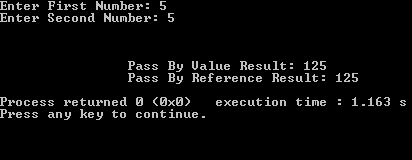
In this example there are two functions one calculates a cube of number with value and other calculates cube of number with reference. With value returns result and with reference not return result.

#include<iostream>
using namespace std;

int pass_Value(int);
void pass_reference(int &);
int main()
{
    int num1,num2;

    cout<<"Enter First Number: ";cin>>num1;
    cout<<"Enter Second Number: ";cin>>num2;

    cout<<"\n\n\n";

    int result=pass_Value(num1);
    cout<<"\t\tPass By Value Result: "<<result<<endl;

    pass_reference(num2);
    cout<<"\t\tPass By Reference Result: "<<num2<<endl;

    return 0;

}

int pass_Value(int number)
{
    return (number*number*number);
}

void pass_reference(int &number)
{
    number=number*number*number;
}


Input Output Example:

see also: Learn Pointers in C++ Programming with Examples


Explanation of functions

  • First function is simple we received a value calculate its cube and return simply the new result.
  • In second function we applies changes using reference of number we sent so no need to return here. As changes are made permanently.


See More Examples Here: C++ Simple Examples
Read More...

Simple Binary search code example in cpp

3 comments
Write a cpp program which takes some elements in an array and a Key in variable then program use Binary Search c++ Algorithm to find the key.
Concept used:
Functions, loop, and if-else statements in c++

Program Explanation:
Program has two functions


  • One to sort array using bubble sort
  • Second to apply Binary Search on array
  • As it is necessary condition to sort the array before applying binary search in main after taking some elements as input in array. 
  • Array passes to bubble sort function to sort the array. 
  • After sorting array passes to Binary Search function which is of 'bool' type if element found in array it returns true else false to main function.

    C++ code for Binary Search

#include<iostream>
 using namespace std;

  // Prototypes of Functions
  void bubbleSort(int array[], int size);
  bool binarySearch(int array[], int size,int key);

  int main(){
      cout<<"Enter 5 numbers randomly : "<<endl;

      // Size can be change by replacing 5
      int array[5]; //Declaring array
     for(int i=0; i<5; i++)
      {
       cout<<"\t";  cin>>array[i]; // Initializing array
      }

      //Passing Arrary for Sorting
       bubbleSort(array,5);

    // Array has Sorted At This Point
    cout<<"\n\t\t\tEnter Key To Search: ";
    int key;
    cin>>key;

//Passing Array, size and key To Search Key
int result=binarySearch(array,5,key);

if(result==1)
cout<<"\n\t\t\tKey Found in Array "<<endl;
else
cout<<"\n\t\t\tKey NOT Found in Array "<<endl;


return 0;
}

void bubbleSort(int array[], int size){
      cout<<"  Input array is: "<<endl;
      for(int j=0; j<size; j++)
      {
       //Displaying Array
       cout<<"\t\t\tValue at "<<j<<" Index: "<<array[j]<<endl;
      }
      cout<<endl;
    // Bubble Sort Starts Here
     int temp;
     for(int i2=0; i2<size; i2++)
   {
     for(int j=0; j<size-1; j++)
     {
        //Swapping element in if statement
           if(array[j]>array[j+1])
       {
        temp=array[j];
        array[j]=array[j+1];
        array[j+1]=temp;
       }
     }
   }
   // Displaying Sorted array
      cout<<"  Sorted Array is: "<<endl;
     for(int i3=0; i3<size; i3++)
   {
    cout<<"\t\t\tValue at "<<i3<<" Index: "<<array[i3]<<endl;
   }
}// Sort Function Ends Here

bool binarySearch(int array[],int size, int key){
         int start=1, end=size;
         int mid=(start+end)/2;

  while(start<=end&&array[mid]!=key){
        if(array[mid]<key){
          start=mid+1;
      }
     else{
          end=mid-1;
          }
       mid=(start+end)/2;
     }// While Loop End

   if(array[mid]==key)
    return true; //Returnig to main
    else
   return false;//Returnig to main

   cout<<"\n\n\n";
}// binarySearch Function Ends Here


Sample Input Output:
Binary search code example in c++ programming tutorial

Recommended: For beginners to keep the program simple array size is small. Change the array size dry run the code on paper it will be very helpful to understand quick.
Another method to of searching


  • Linear search in C++ programming code Example

  • Recursive function in c++ linear search 
  • Read More...

    Recursive function in c++ programming

    3 comments
    This c++ tutorial contains
    • What is a recursion?
    • What are its important parts
    • A simple example code
    • How it affects stack
    Recursion in c++ programming 
    It is one of the most annoying or difficult concept for c++ programming for beginners. Yes it is difficult for a beginner to understand because sometimes its execution goes in depth where things becomes complicated and a beginners feel difficult to understand it.
    A function calls it self until a certain condition is true

    A recursive function has two important parts
    1. Base case, Stopping state, stopping condition
    2. Functions call its self with a specific conditions (Recalling condition)

    When a function calls occur in a program it pushes into the stack. So if a function is calling itself again and again (Recursive Calling) it will be pushing again and again on the stack every time it will push new resources will be allocated for a new call.

    Base Case:

    Its a condition when it becomes true or executes function stop to call it self

    Recalling Condition:
    A condition in which function recalls it  self with a specific parameters or it depends on the required result we want to get.
    • Lets write a simple example to understand the how recursive function works.
    • In this example an integer 'n' is passing to a function in which its value is incrementing by one in recalling condition.
    • When its value becomes 11 or greater than 10 (base case) it returns all calls.


    #include<iostream>
    using namespace std;
    void recursive_function(int n){

           if(n>10)   //base case 
               return;
          else{
               cout<<"Recursive Function call number "<<n<<endl;
               recursive_function(n=n+1)// here function is calling it self
              }
    }
    int main(){
      int n=1;
      recursive_function(n)// function call
    return 0;
    }

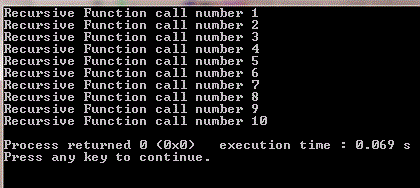
    Its output:
    Recursive function in c++ programming sample output of the code


    Lets have a look to this program it has a problem what


    #include<iostream>
    using namespace std;
    void recursive_function(){
           cout<<"I am Recursive Function"<<endl;
           recursive_function()// here function is calling it self
    }
    int main(){
      recursive_function()// function call
    return 0;
    }

    When we run the above code our program get crashes why?
    When a function is called it puts on to the stack. In the above program function is calling itself again and again and putting its calls on the stack again and again where stack is reserving some resources for each call.
    So the stacks are not in large size and when stack becomes full our program get crashes. This is why because there is not a base case in program where function will stop putting itself on stack.


    It is recommended to understand the concept do experiment with the code and analyze the output and also dry run the code on paper.  Another example in c++
    Read More...

    Bubble sort in c++ code example

    14 comments
    Tutorial contains
    • Bubble sort c++ code
    • Code dry run with explanation
    • Image view of code

     Concept used for bubble sort in this examples are:

    •     int array
    •     nested for loop
    •     if statement


    C++ code

    #include<iostream>
    using namespace std;

    int main(){
         //declaring array
          int array[5];
          cout<<"Enter 5 numbers randomly : "<<endl;
          for(int i=0; i<5; i++)
          {
         //Taking input in array  
           cin>>array[i];        
          }  
          cout<<endl; 
          cout<<"Input array is: "<<endl;
          
          for(int j=0; j<5; j++)
          {
           //Displaying Array 
           cout<<"\t\t\tValue at "<<j<<" Index: "<<array[j]<<endl;        
          }   
          cout<<endl;
        // Bubble Sort Starts Here
         int temp;
         for(int i2=0; i2<=4; i2++)
       {
         for(int j=0; j<4; j++)
         {
            //Swapping element in if statement    
               if(array[j]>array[j+1])
           {
            temp=array[j];
            array[j]=array[j+1];
            array[j+1]=temp;        
           }
         }         
       }
       // Displaying Sorted array
          cout<<"  Sorted Array is: "<<endl;
         for(int i3=0; i3<5; i3++)
       {
        cout<<"\t\t\tValue at "<<i3<<" Index: "<<array[i3]<<endl; 
       }  
    return 0;
    }


    In order to understand bubble sort for a c++ beginner one must dry run the code
    on paper to understand what is actually happening in the code

    Dry run of code with example

    size of the array is 5 you can change it with your
    desired size of array
    Input array is

     5  4  3  2  -5

    so values on indexes of array is
    array[0]= 5
    array[1]= 4
    array[2]= 3
    array[3]= 2
    array[4]=-5

    In nested for loop bubble sort is doing its work

       outer loop variable is i2 will run form 0 to 4
       inner loop variable is  j will run from 0 to 3
             

    Note for each i2 value inner loop will run from 0 to 3

    like when
     i2=0  inner loop  0 -> 3
     i2=1  inner loop  0 -> 3
     i2=2  inner loop  0 -> 3
     i2=3  inner loop  0 -> 3
     i2=4  inner loop  0 -> 3


    input 5  4  3  2  -5
    for i2= 0;
            j=0
            array[j]>array[j+1]
                       5    >   4        if condition true

                    here we are swapping 4 and 5
                    array after 4 5 3 2 -5       


                    j=1
            array[j]>array[j+1]
                       5    >   3        if condition true

                    here we are swapping 3 and 5
            array after 4 3 5 2 -5   


            j=2
            array[j]>array[j+1]
                       5    >   2        if condition true

                    here we are swapping 2 and 5
            array after 4 3 2 5 -5  


            j=3
            array[j]>array[j+1]
                       5    >   -5        if condition true

                    here we are swapping -5 and 5
            array after 4 3 2 -5 5  

             first iteration completed
    ---------------------------------------------------------------------------------------------------------------------

    for i2= 1;
            j=0
            array[j]>array[j+1]
                       4    >   3        if condition true

                    here we are swapping 4 and 3
                    array after 3 4 2 -5 5  


                    j=1
            array[j]>array[j+1]
                       4    >   2        if condition true

                    here we are swapping 4 and 2
            array after 3 2 4 -5 5   


            j=2
            array[j]>array[j+1]
                       4    >   -5        if condition true

                    here we are swapping 4 and -5
            array after 3 2 -5 4 5   


            j=3
            array[j]>array[j+1]
                       4    >   5        if condition FALSE

                    no swapping
            array after 3 2 -5 4 5  
                
    --------------------------------------------------------------------------------------------------------------

    for i2= 2;
            j=0
            array[j]>array[j+1]
                       3    >   2        if condition true

                    here we are swaping 3 and 2
                    array after 2 3 -5 4 5


                    j=1
            array[j]>array[j+1]
                       3    >   -5        if condition true

                    here we are swaping 3 and -5
            array after 2 -5 3 4 5


            j=2
            array[j]>array[j+1]
                       3    >   4        if condition FALSE

                    no swapping
            array after 2 -5 3 4 5   


            j=3
            array[j]>array[j+1]
                       4    >   5        if condition FALSE

                    no swapping
            array after 2 -5 3 4 5 a


    --------------------------------------------------------------------------------------------------------------------


    for i2= 3;
            j=0
            array[j]>array[j+1]
                       2    >   -5      if condition true

                    here we are swaping 2 and -5
                    array after -5 2 3 4 5


                    j=1
            array[j]>array[j+1]
                       2    >   3       if condition FALSE

                    no swapping
            array after -5 2 3 4 5
                      
    at this point we can see that our array is sorted

     but the code will continue to run for remaining iterations
     and every time if condtion will be FALSE because we have got
     required ascending sorted array.

    Hope this will be helpful


     Note there are always more than one ways to code a program
     do experiment with code and keep learning.

    image view of code:
    Bubble sort in c++ code example image view
    Bubble sort in c++ code example


    Output:
    Bubble sort in c++ code example output


    for more examples:
    have a look here      C++ Simple Examples      
    Read More...